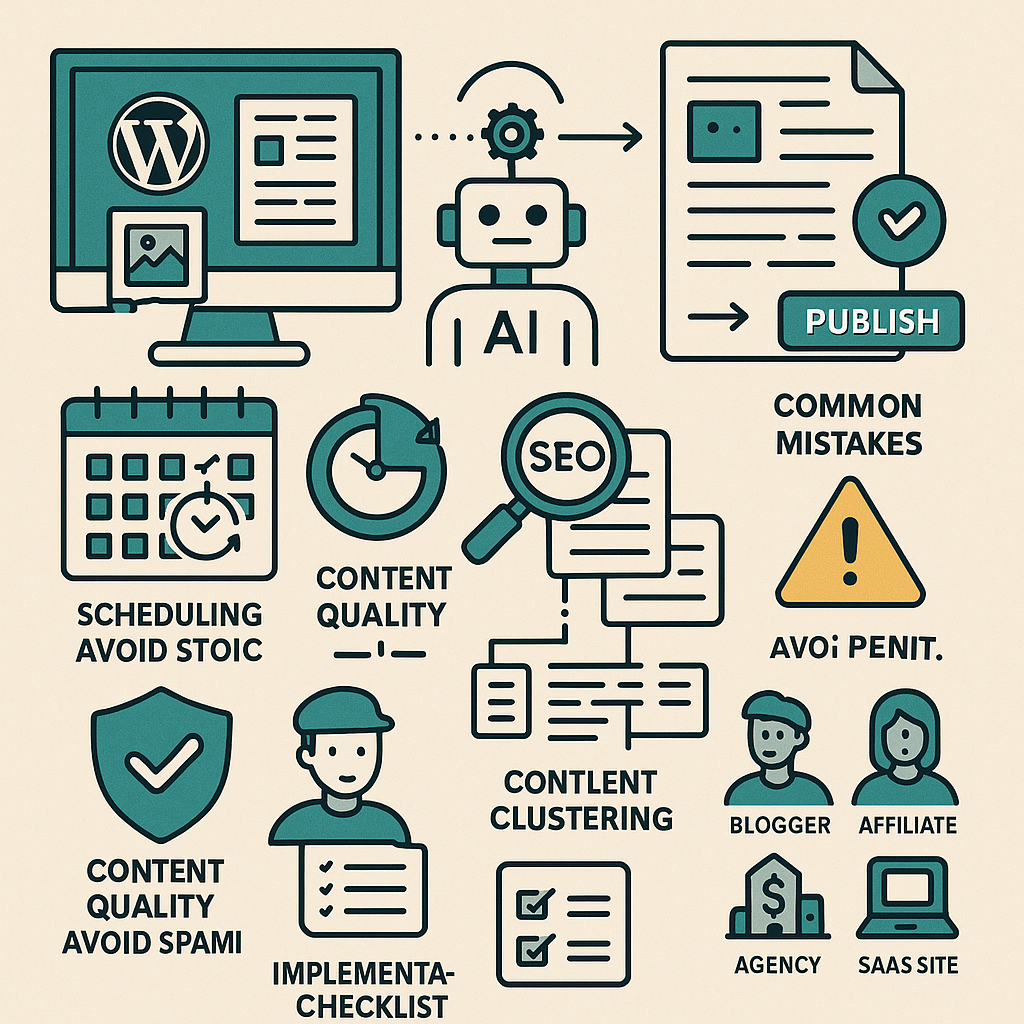
Understanding AI Content Automation Within WordPress
Automating content creation with AI inside WordPress involves integrating intelligent tools that generate, optimize, and schedule content with minimal manual input. These tools leverage natural language processing models and data-driven algorithms to produce drafts, suggest topics, or even publish posts directly. Rather than replacing human creativity, AI acts as a scalable assistant, enabling consistent output while freeing up time for strategic efforts.
How Does AI Content Automation Work?
AI-powered WordPress plugins and external APIs connect to your website to create workflows that include topic ideation, content drafting, SEO optimization, and publishing. Typically, these systems pull from your predefined content clusters, use templates, and apply SEO rules to ensure posts align with your brand voice and search goals. Automation can extend to scheduling posts, rotating topics, and internally linking content based on semantic relevance.
Setting Up Automated Publishing Workflows: A Step-by-Step Guide
Implementing an AI-driven content automation system in WordPress requires deliberate configuration to balance efficiency with quality.
- Choose the Right AI Plugin or Integration: Options include tools like AI Engine, Jasper AI for WordPress, or custom API integrations. Evaluate based on your niche, content type, and budget.
- Define Content Themes and Clusters: Map out primary topics and subtopics to guide AI-generated content and maintain thematic consistency.
- Establish Content Templates: Create outlines or templates that the AI will fill. This controls structure and ensures brand voice continuity.
- Configure Scheduling Parameters: Set publishing frequency, preferred days/times, and content rotation rules to avoid repetition.
- Enable Editorial Oversight: Set up workflows where generated drafts are reviewed and refined before publication to maintain quality.
- Implement SEO Settings: Integrate SEO plugins like Yoast or Rank Math to analyze AI content and optimize metadata, headings, and keyword placement automatically.
Scheduling and Rotating Topics for Balanced Content
Automated scheduling ensures your site maintains a steady stream of new content, but topic rotation is key to engaging diverse audience segments and improving SEO.
- Use a Content Calendar Plugin: Tools like Editorial Calendar or CoSchedule can integrate with AI workflows, making it easier to visualize and adjust publishing plans.
- Implement Topic Rotation Logic: Programmatically cycle through your predefined clusters to prevent topic fatigue and keyword cannibalization.
- Leverage AI to Suggest Trending Topics: Many AI systems can analyze competitor content or current trends to recommend fresh ideas aligned with your clusters.
Maintaining Content Quality and Avoiding Spammy Output
Automation can introduce risks of generic or low-value content. To uphold standards:
- Human Review is Non-Negotiable: Always allocate editorial time to fact-check, enhance readability, and inject unique insights.
- Customize AI Prompts and Inputs: The quality of AI outputs depends on input clarity. Use detailed prompts and data points.
- Use Plagiarism and Readability Checkers: Integrate tools like Copyscape and Hemingway to filter out duplicate or confusing content.
- Limit Fully Automatic Publishing: Prefer draft mode publishing or scheduled review cycles over instant live posts.
SEO Considerations When Automating Content
Automated content must align with SEO best practices to support visibility and ranking growth:
- Keyword Research Integration: Feed AI tools with researched keywords and long-tail terms relevant to your audience.
- Optimize Metadata Automatically: Use SEO plugins to auto-generate meta descriptions, titles, and schema markup.
- Focus on Semantic SEO: Encourage AI to include related terms and natural language variations to improve topical authority.
- Monitor Performance Metrics: Track engagement, bounce rates, and rankings to adjust automation strategies accordingly.
Internal Linking and Content Clustering Strategies
Well-structured internal linking enhances user experience and SEO by signaling content relationships to search engines.
- Cluster Content Around Pillar Pages: Identify cornerstone articles and link related automated posts back to these pillars.
- Automate Link Suggestions: Use plugins or AI tools that recommend or automatically insert internal links based on keyword matches.
- Maintain Link Diversity: Avoid over-linking to a single page; balance links across your cluster for natural navigation.
Common Mistakes and How to Avoid Penalties
Even with automation, pitfalls can jeopardize your site’s reputation and rankings.
- Over-Reliance on AI: Don’t publish AI content without human refinement — this can lead to low-quality or irrelevant posts.
- Ignoring Duplicate Content Risks: Use canonical tags and ensure unique content generation to prevent penalties.
- Keyword Stuffing: Set AI parameters to avoid unnatural keyword repetition.
- Neglecting User Intent: Automate with a focus on solving real user problems and answering their questions.
- Skipping Regular Content Audits: Periodically review automated posts for relevance, accuracy, and SEO compliance.
Practical Use Cases for Different WordPress Users
Bloggers
Bloggers can use AI automation to maintain consistent posting schedules, freeing time to focus on community engagement and monetization strategies.
Affiliate Marketers
Affiliate sites benefit from AI by generating product reviews, comparison posts, and buying guides at scale while using automation to update pricing and availability dynamically.
Digital Agencies
Agencies can deliver rapid content production for multiple clients, customizing voice and SEO settings per brand while maintaining quality control through editorial workflows.
SaaS Companies
SaaS businesses use AI to create technical documentation, blog updates, and customer education content that keeps users informed and reduces support load.
Implementation Checklist: Automating Content Creation in WordPress
- ✅ Select and install an AI content generation plugin or API integration.
- ✅ Define your primary content clusters and topics.
- ✅ Create content templates and detailed AI prompts.
- ✅ Configure scheduling and topic rotation rules in your content calendar.
- ✅ Set up editorial review processes before publishing.
- ✅ Integrate SEO tools to optimize metadata and keyword placement.
- ✅ Implement internal linking strategies with automated suggestions.
- ✅ Monitor performance metrics and audit content regularly.
- ✅ Adjust AI inputs and workflows based on user engagement and SEO results.
- ✅ Train your team on balancing automation with human creativity.
By following this strategic approach, WordPress site owners can harness AI content automation not as a shortcut, but as a powerful growth engine that scales quality content production while preserving brand integrity and SEO effectiveness.
![Understanding AI Website Builders: How They Work and Who Should Use Them [2026-05-29 11:58:17 1bv161]](https://getwpai.com/wp-content/uploads/2026/05/getwpai-20260529-115817.png)
![Mastering AI-Powered Content Automation in WordPress: A Strategic Guide for Scalable Growth [2026-05-25 11:43:01 rdw72k]](https://getwpai.com/wp-content/uploads/2026/05/getwpai-20260525-114301.png)