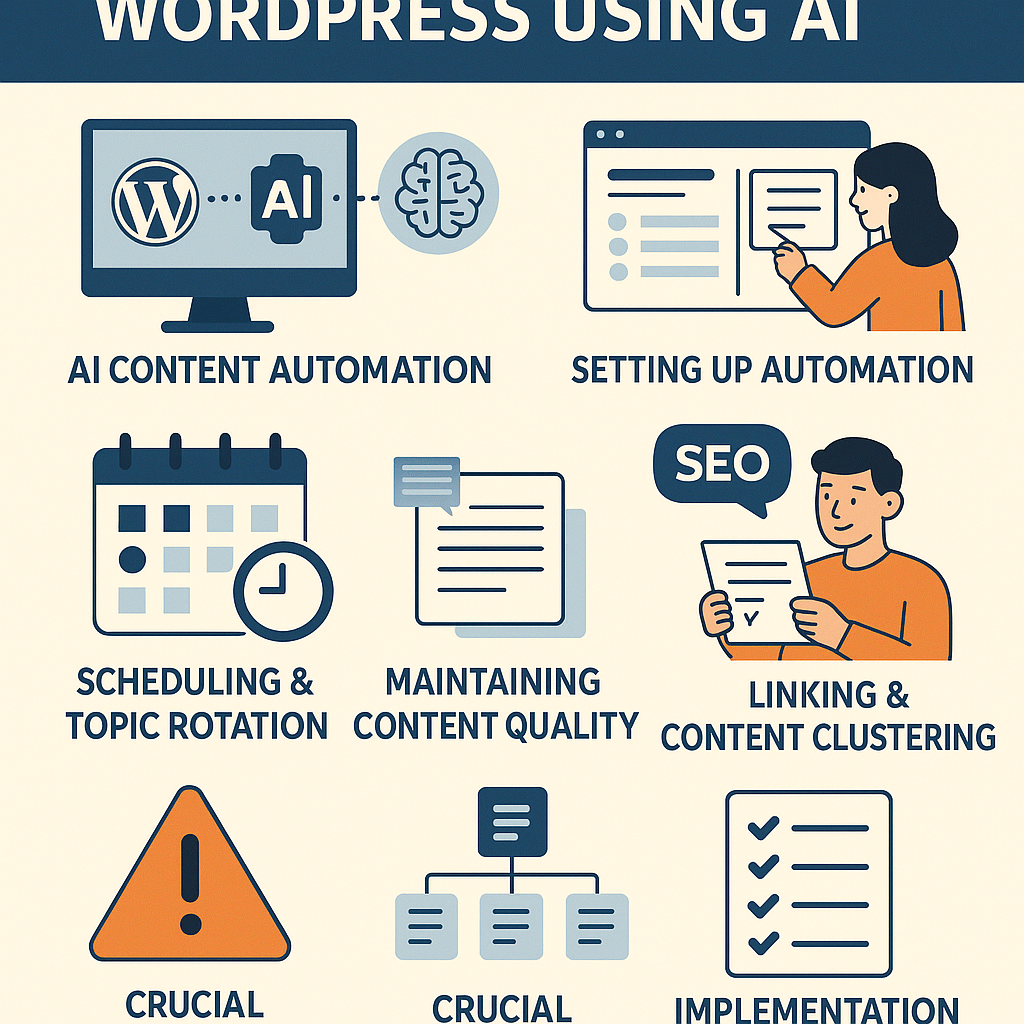
Understanding AI Content Automation Within WordPress
AI content automation in WordPress leverages advanced natural language processing algorithms integrated through plugins or APIs to generate, optimize, and publish content with minimal manual intervention. Instead of treating AI as a shortcut for quick posts, successful automation treats it as a strategic partner to scale consistent, high-quality content aligned with your editorial goals.
Typically, AI tools connect to WordPress via plugins or custom integrations, pulling in prompts or topic data, generating drafts, and enabling scheduled publishing. This process can be fine-tuned with editorial review steps or automatic SEO enhancements.
Step-by-Step Setup for Automated Publishing Workflows
1. Choose the Right AI Plugin or Service
Research AI content generation tools that integrate seamlessly with WordPress, such as AI Engine, ContentBot, or custom OpenAI API setups. Prioritize platforms offering editorial controls, SEO integrations, and workflow automation features.
2. Define Your Content Framework
Create detailed templates or prompt libraries that guide AI to produce relevant, on-brand content. Include tone, style, keyword focus, and structural elements (headings, call-to-actions).
3. Configure Automated Draft Creation
Set your AI tool to generate content drafts automatically based on your templates. Configure triggers such as new topic input, frequency settings, or external data feeds (RSS, keyword trends).
4. Establish Editorial Review and Approval Processes
To maintain quality, route generated drafts to editors or yourself for review before publishing. Use WordPress workflows or plugins like PublishPress to manage approval steps.
5. Automate Publishing and Notifications
Once approved, schedule content to publish automatically. Integrate notifications via email or Slack to alert your team about new posts going live.
Scheduling and Rotating Topics for Content Diversity
Plan your content calendar with a rotation strategy to cover multiple topics and formats evenly. Use keyword research and audience insights to cluster topics by theme.
- Monthly Topic Buckets: Assign themes per month to maintain focus and depth.
- Automated Topic Rotation: Use plugins or scripts to cycle through topic lists, ensuring even coverage.
- Seasonal and Trending Inserts: Inject timely content based on trends or seasonality automatically.
Scheduling tools like Editorial Calendar or CoSchedule can sync with your WordPress AI workflow to keep your pipeline organized.
Maintaining Content Quality and Avoiding Spammy Output
AI-generated content risks becoming generic or spam-like if left unchecked. To safeguard quality:
- Use Human Review: Always include an editorial step to refine AI drafts for clarity, accuracy, and originality.
- Set Clear Prompt Guidelines: Provide detailed instructions to AI regarding style, brand voice, and factual standards.
- Apply Plagiarism Checks: Run generated content through tools like Copyscape to ensure uniqueness.
- Limit Automation Scope: Use AI for ideation and drafts rather than final copy without review.
SEO Best Practices for Automated Content in WordPress
Automating content should never compromise SEO integrity. Implement these tactics:
- Keyword Integration: Feed AI with researched keywords and semantic variants for natural inclusion.
- Meta Data Automation: Automatically generate optimized meta titles and descriptions using AI or SEO plugins like Yoast or Rank Math.
- Schema Markup: Automate structured data insertion to improve search visibility.
- Monitor Performance: Use Google Search Console and analytics to track AI content and adjust strategies.
Internal Linking and Content Clustering Strategies
Boost SEO and user experience by creating interconnected content clusters. Steps include:
- Identify Pillar Topics: Select broad themes serving as hubs.
- Generate Supporting Articles: Use AI to produce detailed posts linked back to pillars.
- Automate Internal Links: Use plugins like Internal Link Juicer or custom scripts to add relevant internal links dynamically.
- Update Clusters Periodically: Refresh content and links to maintain topical authority.
Avoiding Common Mistakes and Penalties
When automating AI content, avoid pitfalls such as:
- Publishing Without Review: Leads to low-quality spammy content flagged by search engines.
- Over-Optimization: Keyword stuffing or unnatural language harms rankings.
- Ignoring Duplicate Content: Ensure uniqueness to prevent penalties.
- Excessive Automation: Balance AI use with human creativity to sustain authenticity.
Use Cases: Tailoring AI Automation for Different WordPress Audiences
Bloggers
Automate research summaries, draft posts, or idea generation to maintain a steady publishing rhythm while focusing on personal storytelling.
Affiliate Marketers
Generate product reviews, comparison tables, and buying guides with SEO-optimized content clusters that funnel traffic efficiently.
Digital Agencies
Offer scalable content services by using AI to produce drafts for clients rapidly, freeing time for customization and strategy.
SaaS Companies
Automate knowledge base updates, feature announcements, and technical blogs to support user engagement and SEO growth.
Implementation Checklist for AI Content Automation in WordPress
- ✔️ Select and install an AI content generation plugin or integrate an API.
- ✔️ Develop detailed content templates and prompt guidelines.
- ✔️ Set up automated draft creation with clear editorial review workflows.
- ✔️ Plan and schedule topics with a rotation system for variety.
- ✔️ Implement SEO best practices: keyword feeding, meta tags, schema markup.
- ✔️ Establish internal linking and content clusters for topical authority.
- ✔️ Use plagiarism and quality checks before publishing.
- ✔️ Train your team on managing AI content responsibly.
- ✔️ Monitor performance and adjust the strategy based on analytics.
By strategically embedding AI content automation into your WordPress site, you transform it from a labor-intensive process into a scalable, quality-driven growth engine. Remember, AI is a tool to empower your editorial vision—not replace it.
![Understanding AI Website Builders: How They Work and Who Should Use Them [2026-05-29 11:58:17 1bv161]](https://getwpai.com/wp-content/uploads/2026/05/getwpai-20260529-115817.png)
![Mastering AI-Powered Content Automation in WordPress: A Strategic Guide for Scalable Growth [2026-05-25 11:43:01 rdw72k]](https://getwpai.com/wp-content/uploads/2026/05/getwpai-20260525-114301.png)