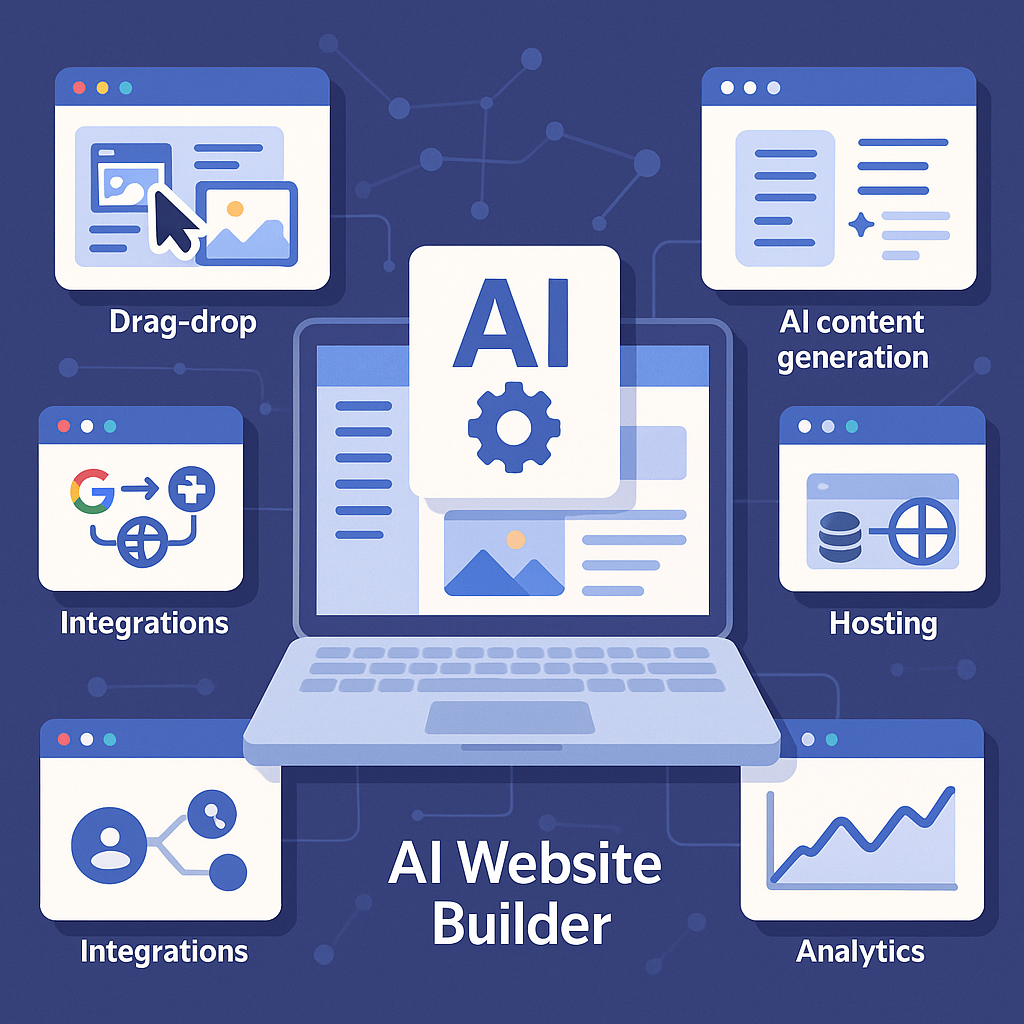
Introduction: The Rise of AI-Powered Website Creation
Building a website traditionally involves multiple steps: selecting a design, creating content, optimizing for search engines, and finally publishing. For many entrepreneurs, small business owners, and creators, this can be time-consuming and technically challenging. AI website builders have emerged as a solution to simplify and accelerate this process by leveraging artificial intelligence to automate various aspects of website creation. As a result, they are gaining traction among users seeking efficient, cost-effective ways to establish an online presence without deep technical expertise.
What Is an AI Website Builder?
An AI website builder is a digital platform that uses artificial intelligence algorithms to automate the process of designing and launching websites. Unlike traditional site builders that rely primarily on manual input and template selection, AI website builders analyze user inputs and preferences to generate personalized website layouts, content, and optimization suggestions. This automation often extends to several critical areas:
- Design and layout: AI generates a visual structure tailored to the user’s industry, style, and goals.
- Content creation: AI tools can draft text for pages, headlines, and calls to action based on minimal user guidance.
- SEO setup: Basic search engine optimization elements, such as meta descriptions and keyword integration, are automatically configured.
The goal is to reduce the manual effort and expertise needed to create a functional, attractive website.
How AI Website Builders Work
The process of creating a website with an AI builder typically unfolds in several stages:
1. User Input and Preferences
The user begins by answering questions about the website’s purpose, industry, target audience, and preferred design style. This input serves as the foundation for the AI’s decisions.
2. AI-Driven Design Generation
Based on the user’s answers, the AI selects or dynamically creates a design layout, including page structure, color schemes, typography, and navigation elements. This step replaces the manual template browsing common in traditional builders.
3. Content Creation and Suggestion
The AI generates initial text for key website sections such as home, about, services, and contact pages. It may use natural language processing models to craft engaging and relevant copy that fits the user’s niche.
4. Customization and Refinement
Users can then adjust the AI-generated design and content using intuitive editing tools. This customization phase allows for personal touches and corrections to ensure the site aligns with the user’s vision.
5. SEO and Performance Optimization
The AI configures fundamental SEO settings, including meta tags, alt text for images, and site speed enhancements. Some platforms offer ongoing SEO suggestions to improve search rankings over time.
6. Publishing and Hosting
Once the site is ready, the user can publish it directly through the platform, which often includes hosting services. The AI builder may also provide analytics dashboards to monitor traffic and engagement.
Key Features to Look For
Drag-and-Drop Editing
Even with AI-generated designs, flexibility is important. A drag-and-drop editor lets users rearrange elements, add new components, and tweak layouts without coding.
AI Content Generation
Look for builders that offer robust AI writing tools capable of producing varied content types, from headlines to detailed page copy, tailored to your industry.
SEO Tools
Effective AI builders integrate SEO features like keyword recommendations, meta tag automation, and sitemaps to help improve search engine visibility.
Integrations
Compatibility with third-party services such as email marketing platforms, payment gateways, and social media channels enhances your site’s functionality.
Hosting
Many AI website builders include hosting, simplifying deployment. Evaluate hosting reliability, speed, and included security features.
Analytics
Built-in analytics provide insights into visitor behavior, traffic sources, and conversion metrics, allowing continual website improvement.
Benefits and Limitations
Benefits
- Speed: Launch a website in a fraction of the time compared to manual methods.
- Cost savings: Reduce expenses related to hiring designers, developers, or content creators.
- Ease of use: User-friendly interfaces make website creation accessible to non-technical users.
Limitations
- Customization constraints: AI-generated templates may limit highly specific or complex design needs.
- Generic content risks: Automated copy might lack unique brand voice or in-depth expertise.
- Dependency on AI logic: The quality of output depends on the AI’s training and may require manual refinement.
Who Should Use an AI Website Builder?
AI website builders are particularly well-suited for:
- Entrepreneurs and startups aiming to quickly establish an online presence without large budgets.
- Small business owners who prefer a straightforward, manageable solution for their websites.
- Bloggers and content creators seeking an easy platform to publish and maintain personal or niche sites.
- Non-technical users who want to avoid the complexities of coding and manual design.
For large enterprises or projects requiring highly specialized features or branding, traditional web development or customized solutions may be more appropriate.
Practical Checklist for Choosing an AI Website Builder
- Ease of Use: Is the onboarding process simple and intuitive?
- Design Flexibility: Can you customize layouts and styles beyond AI defaults?
- Content Quality: Does the AI generate clear, relevant, and engaging text?
- SEO Capabilities: Are SEO features comprehensive and automated?
- Integrations: Does it support essential third-party tools you rely on?
- Hosting and Performance: Are hosting services reliable, fast, and secure?
- Analytics: Are site metrics accessible and actionable?
- Cost Structure: Does pricing fit your budget without hidden fees?
- Support and Resources: Is customer support responsive and are tutorials readily available?
Evaluating AI website builders against these criteria can help you select a platform that aligns with your needs and sets a strong foundation for your online presence.
![Understanding AI Website Builders: How They Work and Who Should Use Them [2026-05-29 11:58:17 1bv161]](https://getwpai.com/wp-content/uploads/2026/05/getwpai-20260529-115817.png)
![Mastering AI-Powered Content Automation in WordPress: A Strategic Guide for Scalable Growth [2026-05-25 11:43:01 rdw72k]](https://getwpai.com/wp-content/uploads/2026/05/getwpai-20260525-114301.png)