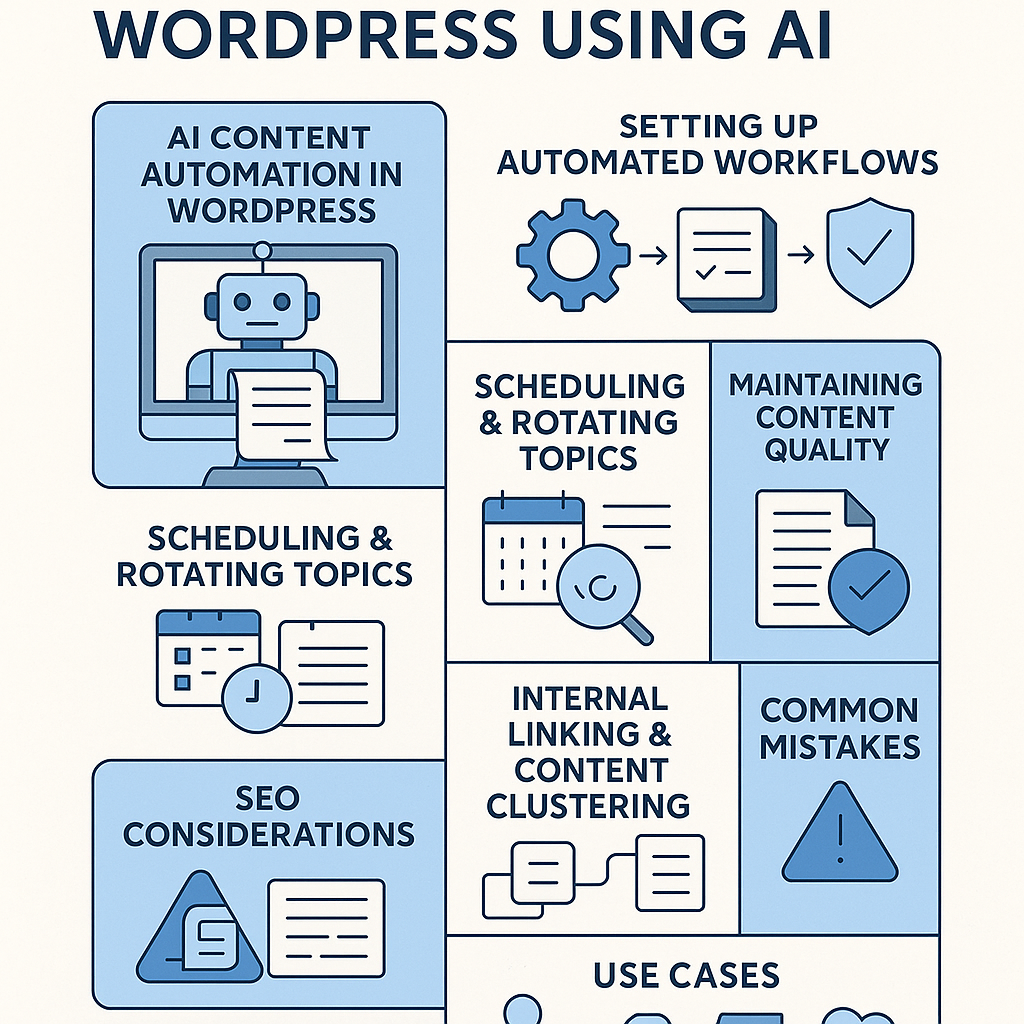
Understanding AI Content Automation Within WordPress
AI content automation in WordPress integrates intelligent tools that generate, optimize, and publish content with minimal manual intervention. These systems typically use natural language generation (NLG) algorithms combined with customizable prompts and templates inside WordPress plugins or external APIs. The automation process can draft posts, suggest topics, optimize metadata, and even handle scheduling directly within the WordPress dashboard.
Unlike simplistic bulk content generators, modern AI automation platforms focus on data-driven topic research, semantic relevance, and style consistency to produce content aligned with your brand and SEO goals. The automation is not about replacing human oversight but amplifying productivity while maintaining editorial control.
Step-by-Step Setup for Automated Publishing Workflows
1. Choose the Right AI Plugin or Integration
Begin by selecting a reputable AI content plugin or service compatible with WordPress, such as Jasper AI, WordLift, or custom GPT-3/4 integrations. Ensure it supports API access, scheduling, and SEO metadata editing.
2. Configure Your Content Parameters
Define your content niches, tone of voice, and keyword targets within the plugin settings. Use templates for standard post types to maintain consistency.
3. Connect Scheduling Tools
Leverage WordPress’s native scheduling or integrate with editorial calendar plugins like Editorial Calendar or CoSchedule to automate publishing dates and times.
4. Set Up Topic Rotation Logic
Create a list of core topics and subtopics. Use plugin features or custom scripts to cycle through these themes systematically, avoiding repetition and covering diverse audience interests.
Scheduling and Rotating Topics Effectively
Automated content workflows benefit greatly from a strategic content calendar. Assign specific days for different content pillars—for example, Mondays for tutorials, Wednesdays for industry news, Fridays for case studies. Use automation to queue posts weeks in advance, rotating through pre-defined topics to maintain freshness and audience engagement.
For instance, configure your AI integration to generate one post per pillar weekly. Rotate keywords and angles by feeding new prompts or updating topic clusters dynamically. This ensures that the site remains topical and authoritative.
Maintaining Content Quality and Preventing Spammy Output
AI-generated content requires rigorous quality control:
- Human Review: Always preview and edit AI drafts before publishing to correct factual errors and improve flow.
- Use Fact-Checking Tools: Integrate plugins or APIs that verify data points, especially for statistics or claims.
- Limit Automation Scope: Automate ideation and drafting but retain human input for final editing and headline crafting.
- Monitor Content Uniqueness: Employ plagiarism checkers to avoid duplicate content penalties.
By combining AI efficiency with human expertise, you safeguard brand reputation and user trust.
SEO Considerations When Using AI Automation
SEO is critical when automating content. Follow these guidelines:
- Keyword Integration: Use AI to embed keywords naturally. Customize prompts to prioritize semantic variations and long-tail phrases.
- Meta Data Optimization: Automate meta titles and descriptions but review them to ensure clickability and relevance.
- Schema Markup: Implement automated schema generation for rich snippets to improve SERP visibility.
- Performance Monitoring: Track results via Google Analytics and Search Console, adjusting AI inputs based on traffic and ranking changes.
Internal Linking and Content Clustering Strategies
Leverage AI to build internal linking structures that support SEO and user navigation:
- Content Clusters: Organize automated posts around pillar pages and related topic clusters to boost topical authority.
- Automated Linking Suggestions: Use AI plugins that recommend or insert internal links based on keyword relevance and anchor text diversity.
- Regular Audits: Periodically review and update internal links to avoid orphan pages and broken links.
For example, if your AI generates a post about “WordPress SEO plugins,” link it to your main “SEO Tools” pillar page and related articles on “site speed” or “keyword research.”
Common Pitfalls and How to Avoid Search Engine Penalties
Improper AI automation can lead to penalties or ranking drops. Avoid these mistakes:
- Overusing AI Without Editing: Producing large volumes of unedited content can trigger spam filters.
- Ignoring E-A-T Principles: Ensure content demonstrates expertise, authoritativeness, and trustworthiness.
- Duplicate Content: Run duplication checks regularly to keep content unique.
- Neglecting User Experience: Avoid keyword stuffing or unnatural phrasing, which harms readability.
Maintain a balanced approach by combining AI speed with careful human curation.
Use Cases: Tailoring Automation for Different WordPress Users
Bloggers
Automate routine posts like weekly news digests or topic roundups, freeing time for in-depth original content.
Affiliate Marketers
Generate product reviews and comparison articles at scale while managing SEO metadata and affiliate disclosures automatically.
Digital Agencies
Use automation to handle multiple client blogs efficiently, applying consistent branding and SEO strategies across sites.
SaaS Companies
Produce technical documentation, feature updates, and customer success stories with AI assistance, integrated into WordPress for seamless content delivery.
Implementation Checklist for AI Content Automation in WordPress
- [ ] Select and install a reliable AI content generation plugin or API integration
- [ ] Define your content themes, keywords, and style guidelines clearly
- [ ] Set up an editorial calendar with scheduled publishing slots and topic rotation
- [ ] Establish a quality review workflow involving human editors
- [ ] Automate SEO metadata and schema markup with regular audits
- [ ] Build and maintain internal linking structures aligned with content clusters
- [ ] Monitor analytics and adjust AI inputs based on performance metrics
- [ ] Train your team on spotting and correcting AI-generated errors or spam signals
By strategically integrating AI-driven content automation within WordPress, site owners can scale publishing without sacrificing quality or SEO integrity. This approach transforms AI from a mere tool into a core growth strategy.
![Understanding AI Website Builders: How They Work and Who Should Use Them [2026-05-29 11:58:17 1bv161]](https://getwpai.com/wp-content/uploads/2026/05/getwpai-20260529-115817.png)
![Mastering AI-Powered Content Automation in WordPress: A Strategic Guide for Scalable Growth [2026-05-25 11:43:01 rdw72k]](https://getwpai.com/wp-content/uploads/2026/05/getwpai-20260525-114301.png)